The short answer
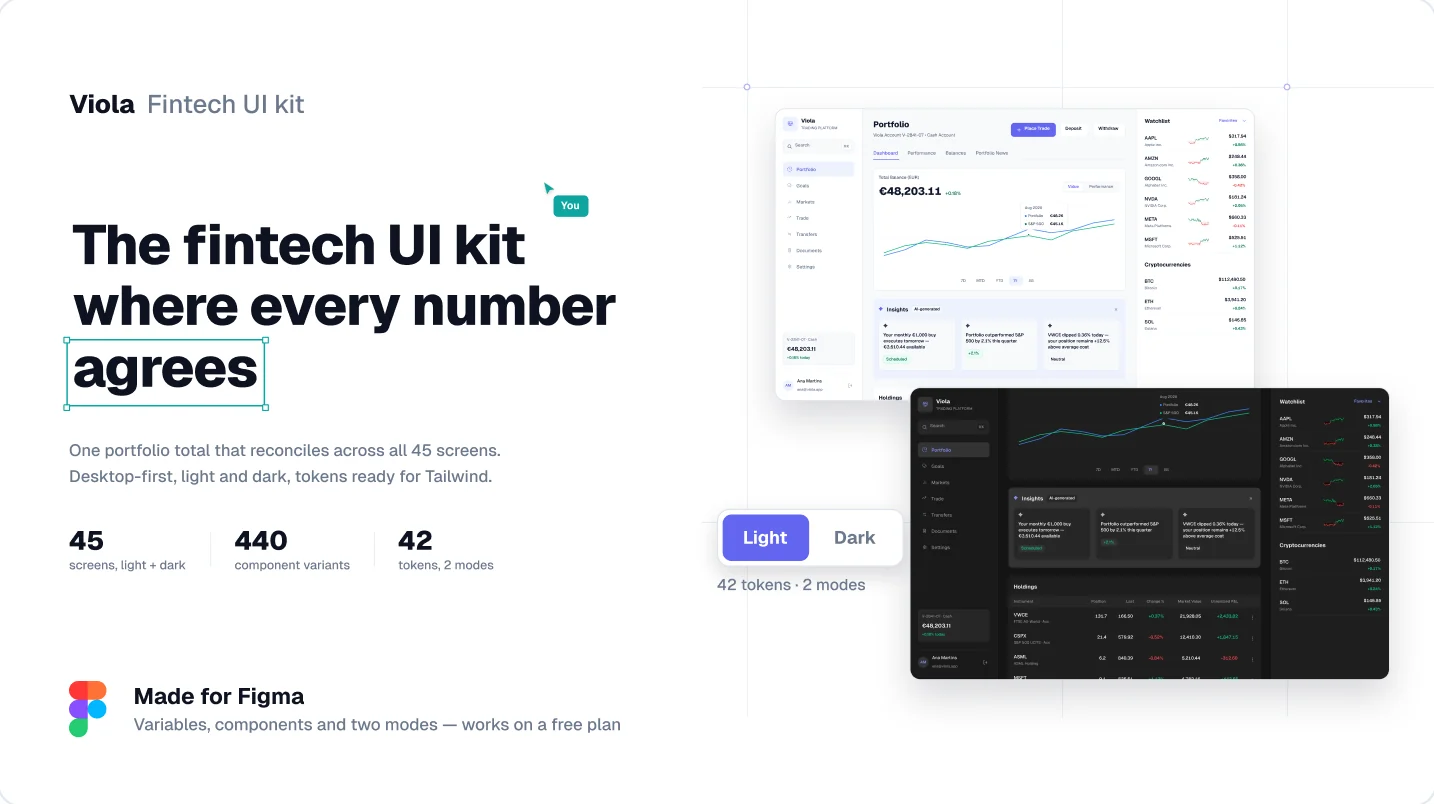
If you’re designing a finance dashboard, Untitled UI gives you the most building blocks and Viola gives you the finance screens already built. Untitled UI is a general design system for any product. Viola is a fintech kit: investing, trading, cash and onboarding screens that all run on one portfolio, so the numbers agree everywhere.
I’m the designer behind Viola, so read this with that in mind. I’ve tried to be fair: Untitled UI is excellent, and for many projects it’s the better buy. This post is about one specific job, a finance or investing dashboard, and which kit gets you there faster.
The verdict: for the product shell, start from Untitled UI. For the money screens, start from Viola.
In short
- Untitled UI is a general design system with 10,000+ components and variants. Viola is a fintech kit with 440 variants and 45 finance screens.
- Viola runs every screen on one portfolio, so totals, tables and charts agree. General kits fill each screen separately.
- Viola includes the flows around a dashboard: KYC, trading, EUR/USD cash, transfers and tax documents.
- Untitled UI has React components. Viola is Figma only, with tokens named to match Tailwind and shadcn.
- Viola costs $49 for one designer. Untitled UI’s Figma kit starts at $129.
How we compared them
We looked at one job: designing an investing or portfolio dashboard in Figma. Each section below covers one thing that job needs, and ends with a verdict.
- Data: do the numbers agree across screens?
- Coverage: are the screens around the dashboard included?
- Finance conventions: are money-specific rules built in?
- AI patterns: is there guidance for AI next to money?
- Cost and workflow: price for one designer and for a team, code, and AI tools.
Every Untitled UI figure comes from untitledui.com and its pricing page, checked on 13 October 2026. Viola figures come from the kit itself.
A finance dashboard’s total has to equal its parts
In a finance product, the first person to check the math is the one deciding whether to fund it. Most kits fill each screen with its own made-up numbers, so the dashboard total and the holdings table quietly disagree.
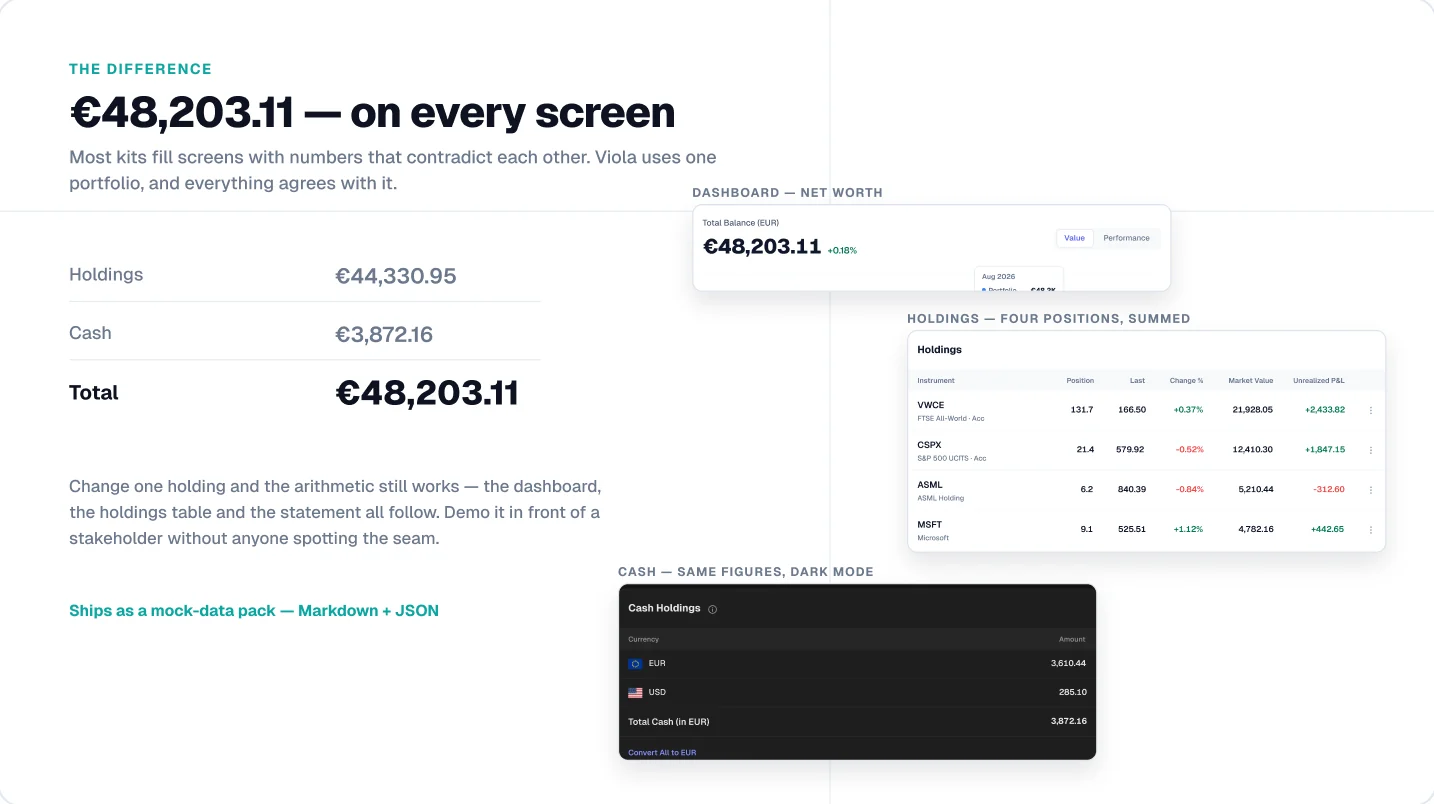
Viola runs every screen on one portfolio. €48,203.11 on the dashboard is €44,330.95 in holdings plus €3,872.16 in cash. The holdings table, fund page and cash account show the same figures, in light and dark, and the data ships as a Markdown and JSON pack for developers.
Untitled UI’s dashboards are built to show layouts across many products, not to share one dataset. If your numbers need to hold up in a demo, you’d reconcile them yourself.
See it in the file
The free Viola file includes the portfolio dashboard with these numbers, in light and dark.
Verdict: Viola, if your numbers have to survive a demo.
A dashboard is only one screen of a money product
Users reach a finance dashboard through identity checks, fund it through transfers and leave it to place a trade. Designing the dashboard alone leaves most of the product still to draw.
Viola’s 45 desktop screens cover the journey around it: KYC onboarding with a stepper, markets, fund research, a trade ticket, transfers, cash in EUR and USD, tax documents and settings. Each screen exists in light and dark, so 90 frames in total.
Untitled UI gives you more page types overall, from pricing pages to landing pages, but these finance flows aren’t its focus.
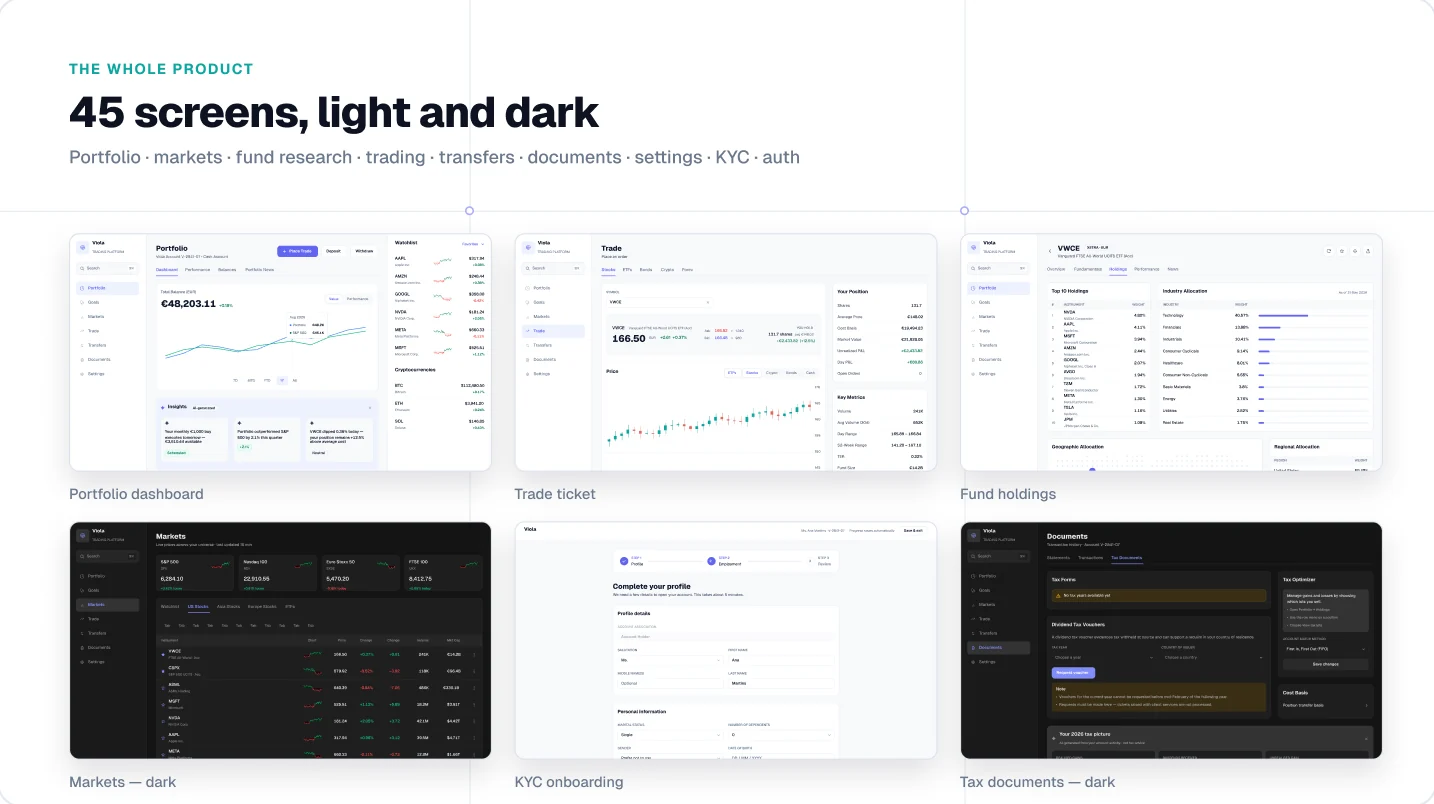
Verdict: Viola for the finance journey. Untitled UI if you need many non-finance page types.
Green and red mean profit and loss, nothing else
Finance screens follow conventions that general kits don’t need to care about. Break one and users misread their money. These are the rules Viola is built on.
| Convention | Why it matters | In Viola |
|---|---|---|
| Tabular figures | Digits share one width, so columns of amounts line up and values don’t jump when they update | Set on every money text style |
| P&L colour | Green and red already mean gain and loss, so using them for anything else sends a mixed signal | Reserved for profit and loss only |
| Accent colour | The brand colour on an amount reads as an action or a highlight, not a value | Never used on money |
| Signed changes | A change needs its sign and its percentage, not colour alone, to be readable | Shown as +€2,433.82 (+12.5%) |
| Currency | Mixed-currency balances must say which currency the total is in | Cash split by EUR and USD, total labelled “in EUR” |
| Number format | €48,203.11 in one locale is 48.203,11 € in another, so columns must fit both | Shown in English format; leave room if you localise |
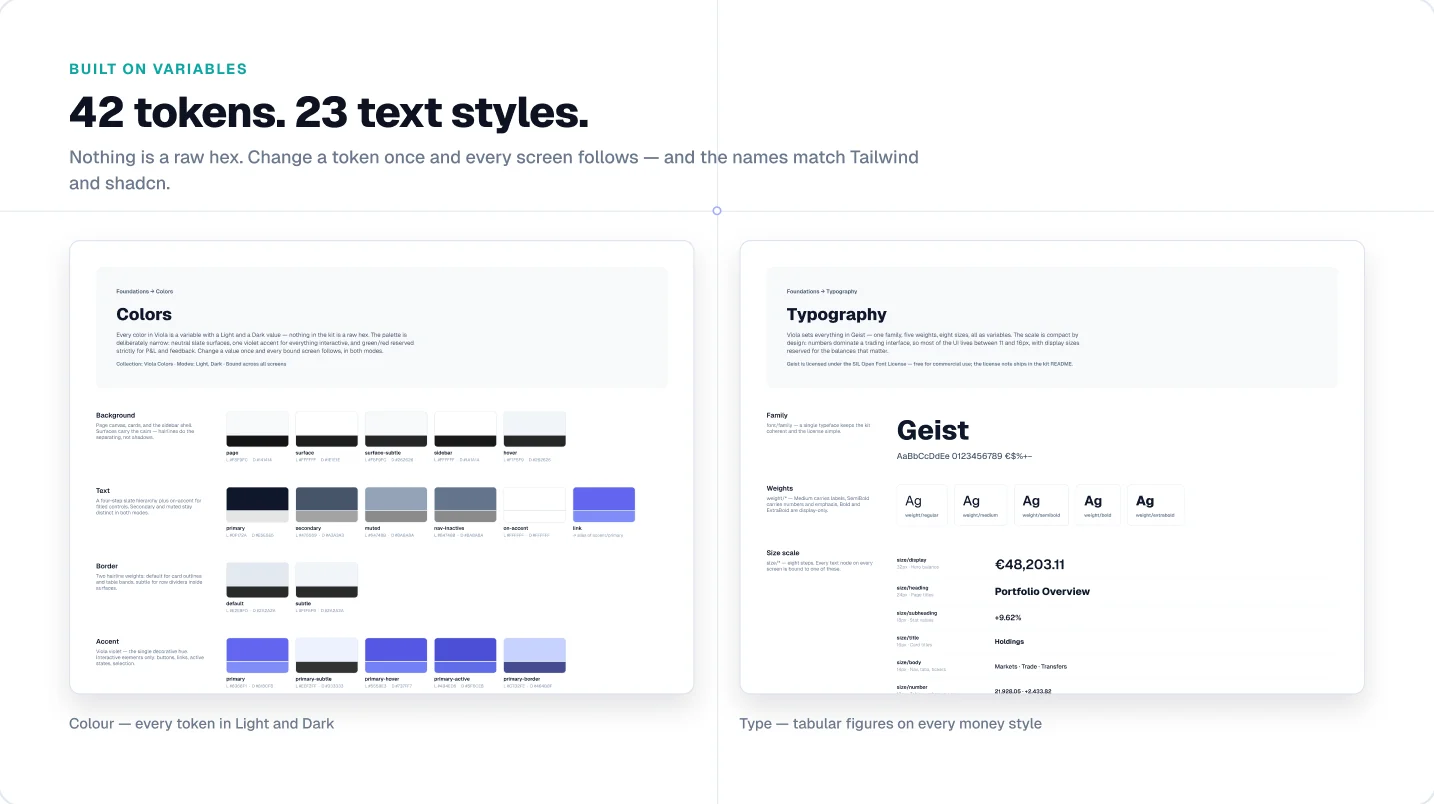
Verdict: Viola ships these rules. With Untitled UI, you’d set them up yourself.
AI near money needs rules, not only components
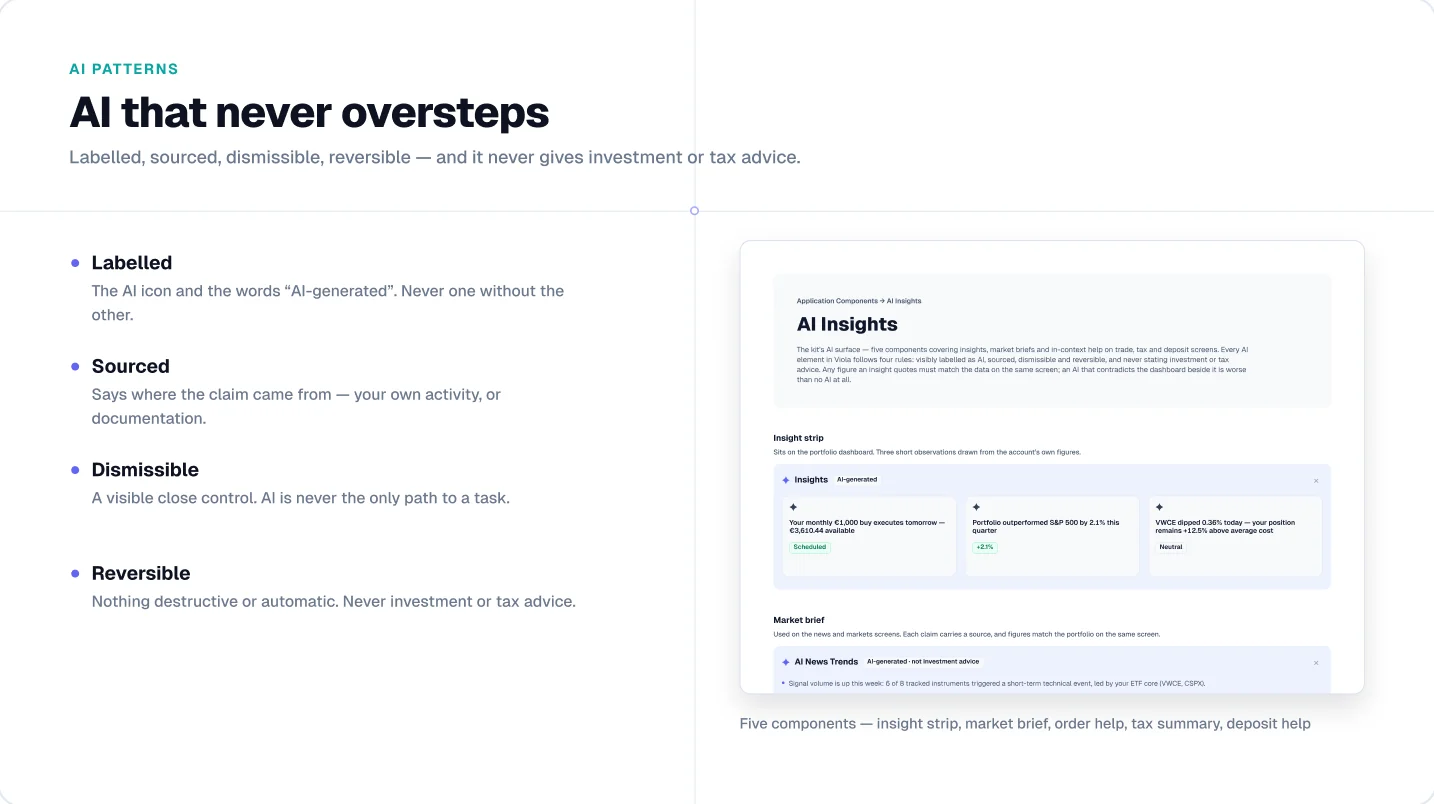
An AI suggestion on a trade screen carries more weight than one in a writing app. Users need to know it came from AI, where the claim came from, and that nothing happens without them.
Viola’s five AI components follow four rules. They’re labelled with the AI icon and the words “AI-generated”. They’re sourced, saying where each claim came from. They’re dismissible, so AI is never the only path to a task. And they’re reversible: nothing destructive or automatic, and never investment or tax advice.
The five components are an insight strip, a market brief, order help, a tax summary and deposit help, each placed on the screen where it’s used.
Verdict: Viola, if AI features sit next to money in your product.
At a glance
| Untitled UI | Viola UI | |
|---|---|---|
| Built for | Any product: SaaS, marketing sites, apps | Fintech and AI products: investing, trading, portfolio |
| Size | 10,000+ components and variants, 420+ page examples | 440 component variants, 45 desktop screens |
| Dashboards | 60 dashboard examples, across many product types | Portfolio, markets, fund research, trading, cash, documents |
| Finance flows | Not the focus | KYC onboarding, trade ticket, EUR/USD cash, tax documents |
| Sample data | Varies screen to screen | One portfolio on every screen: €48,203.11 = €44,330.95 holdings + €3,872.16 cash |
| AI patterns | General components | 5 AI components: insights, market brief, order help, tax summary, deposit help |
| Dark mode | Yes, via variables (PRO VARIABLES version) | Yes, every screen, 42 colour tokens in Light and Dark |
| Code | React components (paid, from $349; base components free) | Figma only; tokens named to match Tailwind and shadcn |
| Free version | Free Figma kit and free React base components | Free Figma file: portfolio dashboard in light and dark, 190+ variants |
| Price (Figma, one user) | From $129 | $49 |
| Team price | From $399 (up to 8 users) to $2,499 (unlimited) | $179, unlimited users in one company |
Untitled UI figures from untitledui.com, checked 13 October 2026.
When Untitled UI is the better choice
Pick Untitled UI if the dashboard is one part of a bigger product. If you also need a marketing site, pricing pages, settings, onboarding emails and an app, its 420+ page examples cover far more ground than any niche kit.
It also wins on these:
- Breadth of components. 940 button variants, 252 modal variants, 2,000+ icons and logos. If a component exists in web UI, it’s probably there.
- Code. The React version (React, Tailwind CSS, TypeScript, React Aria) means design and development start from the same library. Viola is Figma only.
- Bigger teams. Seat tiers up to unlimited users and a large community already using it, so new hires may know it.
- A non-finance product. For a CRM, an analytics tool or a SaaS admin panel, finance-specific screens would mostly go unused.
Pros and cons
| Pros | Cons | |
|---|---|---|
| Untitled UI | 10,000+ components and variants; 420+ page examples; React version; seat tiers for large teams | Not built around finance flows or one shared dataset; a bigger file to learn and trim; from $129 for Figma alone |
| Viola | One portfolio across all 45 screens; KYC, trading, cash and tax flows included; finance and AI rules built in; $49 | Figma only, no React components; 440 variants, so non-finance pages need another kit; desktop screens only; newer, smaller community |
Using both
You don’t have to choose. A common setup is Untitled UI for the marketing site and general app chrome, and Viola for the finance screens inside the product. Viola’s tokens are named to match Tailwind and shadcn, and Untitled UI’s code is built on Tailwind, so mapping colours and spacing between them is mostly a rename. Expect to align a few things by hand, like corner radius and font: Viola uses Geist throughout.
What it costs
Both are one-time purchases. The gap grows with team size, because Viola’s Team licence covers unlimited users in one company.
| Team size | Untitled UI Figma | Viola |
|---|---|---|
| 1 designer | $129 (PRO SOLO) | $49 (Individual) |
| Up to 8 | $399 (PRO STUDIO) | $179 (Team) |
| Up to 20 | $999 (PRO BUSINESS) | $179 (Team) |
| Unlimited | $2,499 (PRO ENTERPRISE) | $179 (Team) |
Untitled UI prices are its current prices on its pricing page, shown beside higher crossed-out ones, on 13 October 2026. Untitled UI also covers far more than finance, so this compares price, not value per component.
Verdict: Viola is cheaper at every team size, if finance screens are what you need.
AI and agent workflows
More teams now hand a Figma file to an AI tool and ask it to build the screen. Two things decide how well that goes: whether the names in the file match the code, and whether the content makes sense.
- Untitled UI has the stronger code story. Its React components are built on Tailwind CSS and you own the code, so an agent can use the real components instead of guessing.
- Viola has no code, but its tokens are named to match Tailwind and shadcn, so an agent maps them without a translation step. Its sample data ships as Markdown and JSON, so the built screen shows the same reconciled numbers as the design.
Verdict: Untitled UI if you want ready React components. Viola if you’re building on shadcn and want the finance content to carry over.
Which fits your kind of project
| Project | Start from | Why |
|---|---|---|
| Investing or brokerage app | Viola | Portfolio, holdings, fund pages and trade ticket share one dataset |
| Trading platform | Viola | Markets, order entry and P&L conventions are already designed |
| Wealth or portfolio tracker | Viola | Multi-currency cash and reconciled totals |
| Neobank or payments app | Either | Viola covers transfers, cash and KYC; Untitled UI has more general app screens |
| SaaS product with a billing or revenue page | Untitled UI | Finance is one feature; you need the rest of the product |
| Marketing site for a fintech | Untitled UI | Landing and pricing page examples |
| You need production React components | Untitled UI | Viola is Figma only |
| Pitch or investor demo on a tight budget | Viola | $49, and the numbers hold up when someone checks them |
Not sure yet? Both have free versions. Open the dashboard in each and see which one is closer to what you’re building.
FAQ
Is Viola an alternative to Untitled UI?
For finance and investing products, yes. For general SaaS or marketing sites, no: Viola is focused on fintech and AI screens, while Untitled UI covers any product.
Does Untitled UI have finance dashboards?
Untitled UI includes 60 dashboard examples across product types. They’re general-purpose rather than built around a single finance dataset or finance flows like KYC and trading.
Does Viola work on a free Figma plan?
Yes. Light and Dark modes switch through variables and work on a free Figma plan.
Is there a free version of Viola?
Yes. The free Figma Community file includes the portfolio dashboard in light and dark, 190+ component variants and 39 icons, free for personal and commercial projects.
Can I use Viola and Untitled UI in the same project?
Yes. Many teams use a general kit for the product shell and a fintech kit for the money screens. Viola’s tokens follow Tailwind and shadcn naming, which makes mapping between the two straightforward.
Try it
Start with the free Viola file: the portfolio dashboard in light and dark, ready to open in Figma. If it fits, the full kit is $49 for one designer or $179 for your whole company.
Sources
- Untitled UI homepage, features, pricing and licence, read 13 October 2026
- Untitled UI pricing, read 13 October 2026

WRITTEN BY
Kseniya Savitsyna
Product designer working on fintech & AI products, and the designer behind Viola UI.