An AI coding agent can build a Viola UI screen well if it can read the decisions behind the kit: which green means a gain, which text style a table figure uses, which numbers are real. A Figma file holds those decisions, but an agent working in your code can’t see them. The Viola UI agent pack writes them down as files the agent reads.
The free pack matches Viola UI’s free Figma file. It has a rules file for any agent, a Claude Code skill, a Cursor rule, a guide to the free file’s components, the kit’s tokens in three formats and the dashboard figures. The full kit comes with a full pack that adds every component, a review skill and the complete sample data. Below is what each file does, where each tool reads it and one card built with it.
In short
- AGENTS.md holds the rules. Claude Code, Cursor and Codex all read it, Claude Code through a one-line CLAUDE.md.
- A Claude Code skill adds the order of work: read the tokens and data, map, build, check, report the gaps.
- The tokens come as CSS variables, a Tailwind config and W3C Design Tokens files, in Light and Dark.
- data/portfolio.md gives the agent real figures, so it doesn’t invent them.
What agents miss
An agent can read your code and, with Figma’s MCP server, your frames. What it can’t infer is why a value is what it is. It doesn’t know that green is reserved for money that moved, that an accent never colours an amount, or that €48,203.11 has to be the same number on every screen. Without those rules it fills the gaps with defaults, which is why so many generated apps look alike.
What’s in the agent pack
| File | Read by | What it does |
|---|---|---|
| AGENTS.md | Every agent | The rules: tokens, P&L colours, numbers, AI, copy |
| CLAUDE.md | Claude Code | Imports AGENTS.md, points to the skill |
| viola-ui/SKILL.md | Claude Code | Order of work and a final check |
| viola-ui.mdc | Cursor | Always-on rule, short version |
| components.md | Agents, people | Free: the free file’s 10 components. Full: all |
| tokens.md | Agents, people | Every token, Light and Dark, and its use |
| tokens.css | Web projects | Variables, Light in :root, Dark in .dark |
| tailwind.v4.css, .config.js | Tailwind CSS v4 and v3 | Classes such as bg-bg-surface |
| *.tokens.json | Token tools | W3C Design Tokens format |
| portfolio.md | Agents | Free: dashboard figures. Full: plus cash, orders, watchlists, alerts, tax |
README.md
AGENTS.md
CLAUDE.md
.claude/skills/viola-ui/SKILL.md
.cursor/rules/viola-ui.mdc
components.md
tokens/tokens.md
tokens/tokens.css
tokens/tailwind.config.js
tokens/tailwind.v4.css
tokens/light.tokens.json
tokens/dark.tokens.json
tokens/base.tokens.json
data/portfolio.mdThe rules every agent reads
AGENTS.md is a plain Markdown file of under 40 lines. Every rule in it comes from the kit itself. These are the ones that matter most on a money screen:
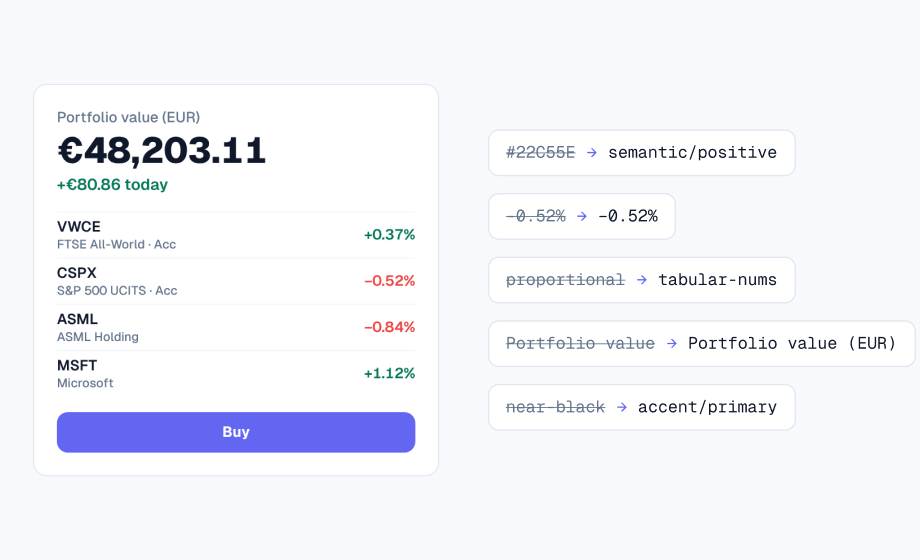
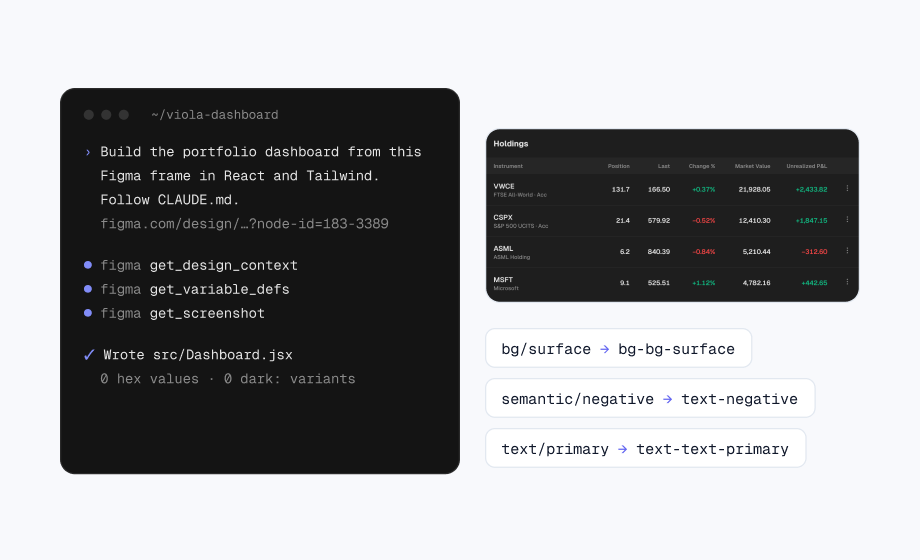
- Every colour is a Viola token. Figma bg/surface is the CSS
  variable --bg-surface and the Tailwind class bg-bg-surface.
- semantic/positive and semantic/negative are only for money that
  moved: gains and losses. Never status, badges or chart series.
- accent/primary is for actions, links, active states and AI.
  Never colour an amount with it.
- Every amount and percentage uses tabular figures.
- Gains carry +. Losses use the minus sign (−), not a hyphen.
- Never show a price or total without its currency.
- Never invent, round or recalculate a figure. Use
  data/portfolio.md.
- If a value has no matching token, don't invent one. Name the
  layer and its value in your summary.
The Claude Code skill
A skill is a folder in .claude/skills with a SKILL.md inside. Claude Code reads its description to decide when to use it, and you can run it yourself by typing /viola-ui. When we opened a project with the pack in it, Claude Code listed the skill as viola-ui with no extra setup. The full pack adds a second skill, /viola-review, which checks a diff against the rules and names the token or component that fixes each finding.
- 1. Read. Open tokens.md, components.md and portfolio.md. If a Figma link is given and the MCP server is connected, read the frame and its variables.
- 2. Map. Turn each Figma variable into its token and each text layer into a text style.
- 3. Build. Use the project’s components first, then token classes. Dark mode comes from the .dark class.
- 4. Check. Search the changes for hex values, palette classes, dark: variants, off-scale sizes, hyphens used as minus signs and figures that aren’t in the data.
- 5. Report. List what was built, the tokens used and any gaps, instead of inventing a value.
1 file checked: 5 blocking, 4 major, 6 minor.

[blocking] raw-color — src/HoldingRow.jsx:5
  text-green-600 on "-0.52%"
  Fix: text-semantic-negative (semantic/negative).
  It's a loss, so red, not green.

[major] hyphen-minus — src/HoldingRow.jsx:5
  "-0.52%"
  Fix: "−0.52%" (minus sign).
One card, built with the pack
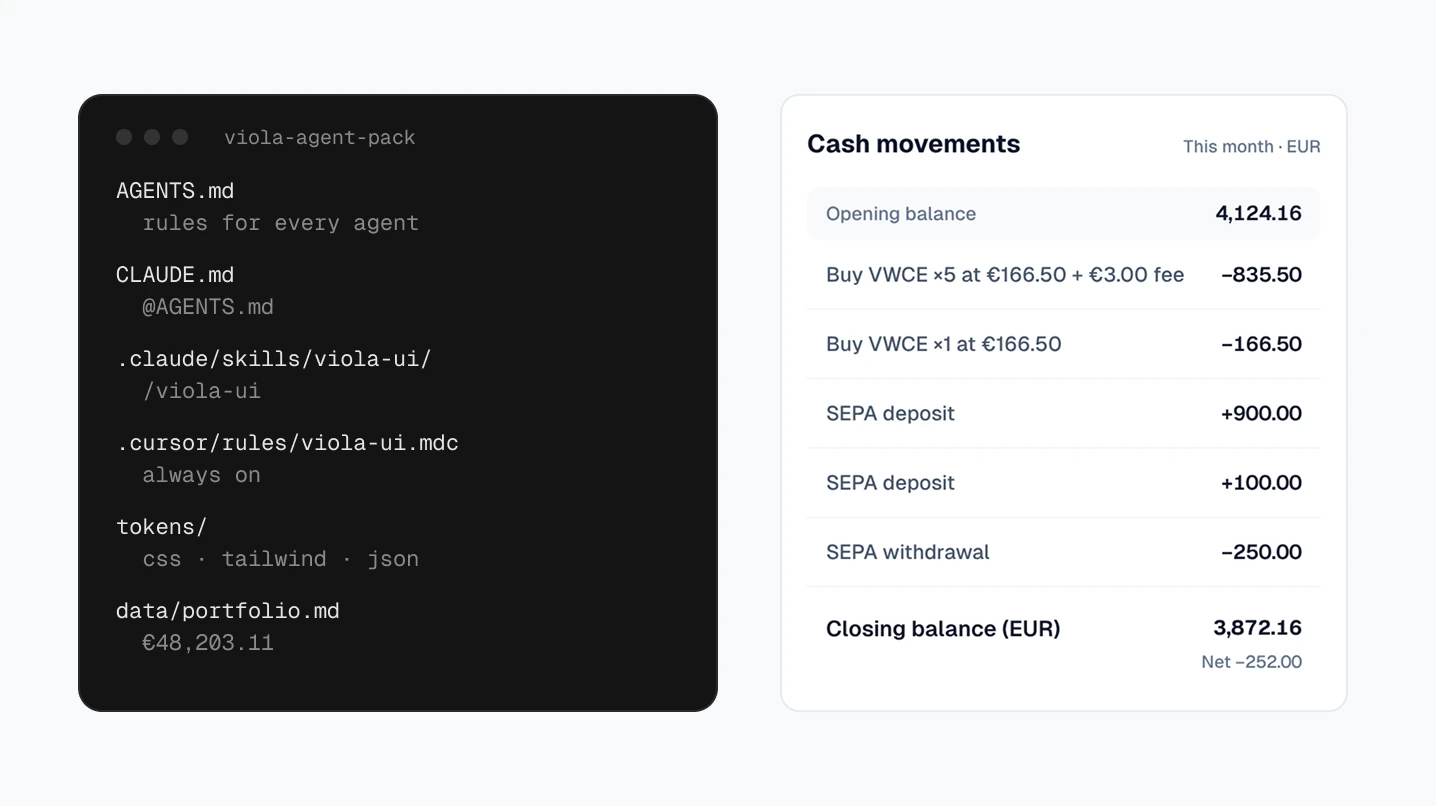
We asked for a cash movements card for this month, in React and Tailwind, in a project with nothing but the full pack. Every figure comes from its portfolio.md: opening balance 4,124.16, five movements, closing balance 3,872.16 (EUR), net −252.00.
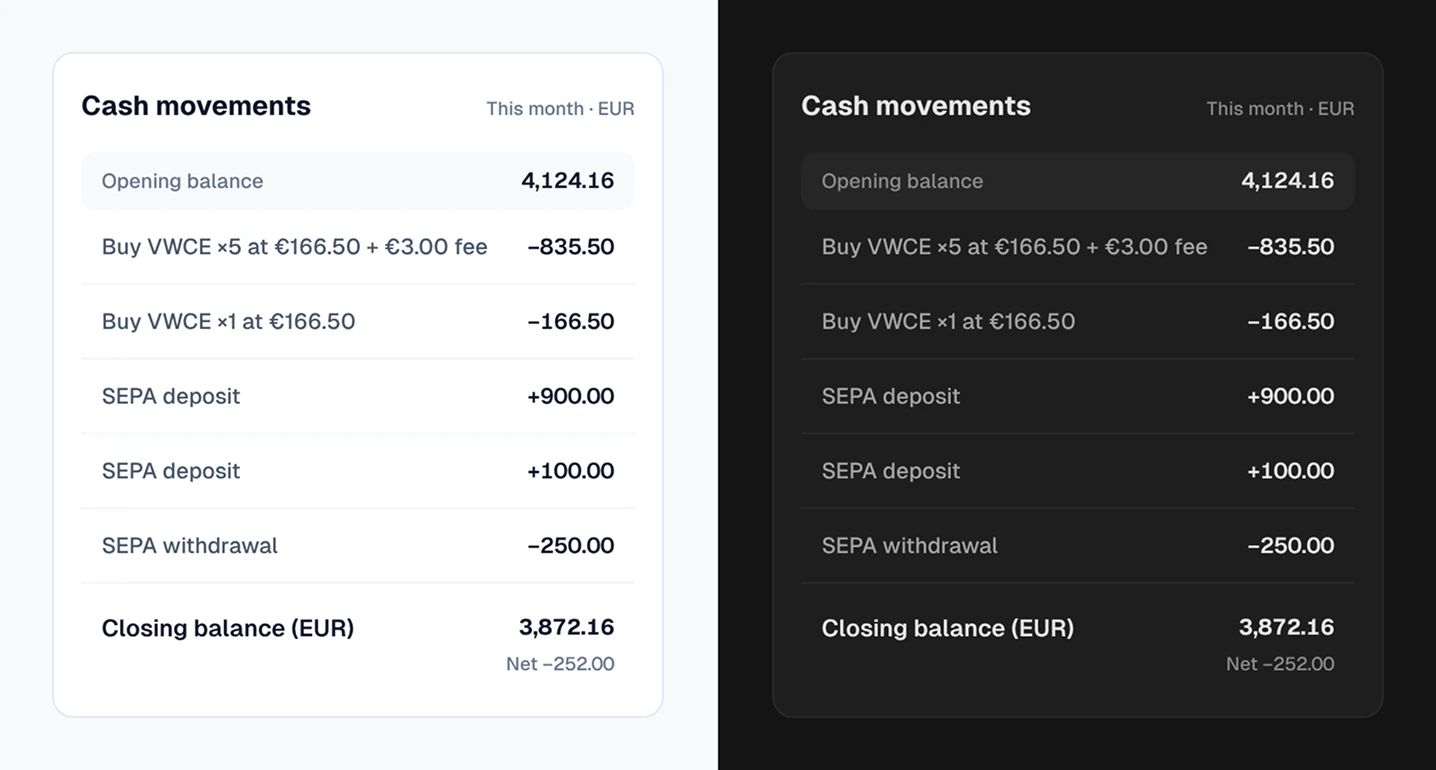
Two details show the rules at work. The deposits aren’t green and the withdrawals aren’t red, because cash moving in and out isn’t profit or loss. And the first version had rows with no height: it used h-11, a step that isn’t on Viola’s spacing scale, so Tailwind generated nothing for it. We added control sizes to the Tailwind config and an off-scale check to the skill, so the next run catches it.
Tokens in three formats
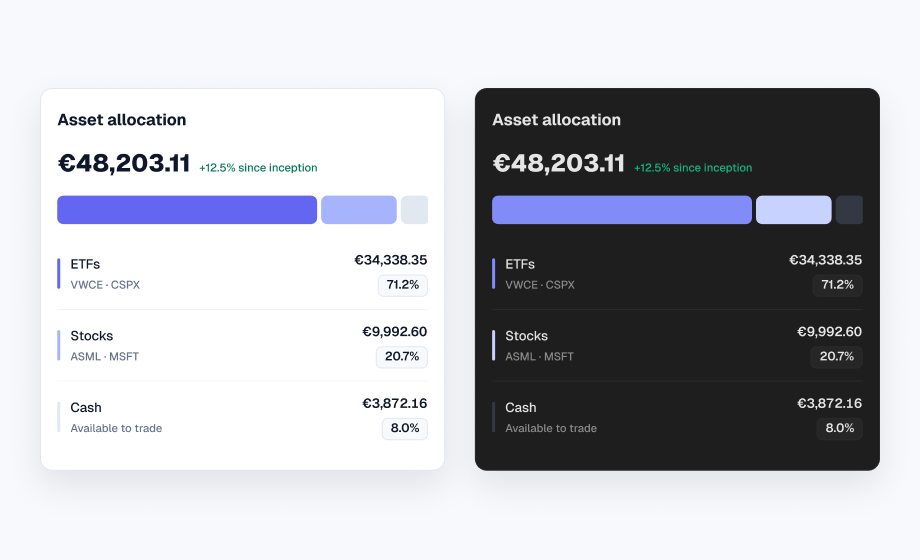
- tokens.css: every colour as a CSS variable, Light under
:rootand Dark under.dark, so a screen switches with one class. - Tailwind:
tailwind.v4.cssfor v4 andtailwind.config.jsfor v3, with the same classes pointing at the variables. Spacing is Viola’s scale only. - W3C Design Tokens:
light.tokens.jsonanddark.tokens.jsonfor colours andbase.tokens.jsonfor type, spacing and radius, in the format the W3C community group published in October 2025.
The W3C format doesn’t define modes, so Light and Dark are two files with the same token names. A tool such as Style Dictionary can build them into code for other platforms.
"positive": {
  "$type": "color",
  "$value": {
    "colorSpace": "srgb",
    "components": [0.0157, 0.4706, 0.3412],
    "alpha": 1,
    "hex": "#047857"
  },
  "$description": "Gains only"
}
Where each tool reads it
| Tool | Reads | Notes |
|---|---|---|
| Claude Code | CLAUDE.md, .claude/skills | Our CLAUDE.md imports AGENTS.md with @AGENTS.md |
| Cursor | .cursor/rules/*.mdc, AGENTS.md | Plain .md files in .cursor/rules are ignored |
| Codex | AGENTS.md | Read from the project root down before it starts |
If your project already has a CLAUDE.md or AGENTS.md, add our rules to it instead of replacing it. The .claude and .cursor folders start with a dot, so macOS Finder hides them until you press Cmd+Shift+.
With Figma’s MCP server
The pack and Figma’s MCP server do different jobs. The server tells the agent what is on a frame. The pack tells it what the values mean and which figures are real. With both, the agent can read a Viola UI frame and map it to tokens instead of copying hex values. The Claude Code guide walks through a full screen.
Test your setup
Ask your agent for a screen you already have in Figma, such as the holdings table. Then check three things: the output uses token names, not hex values; it switches to Dark with the .dark class alone; and every figure matches portfolio.md. If one fails, the agent didn’t read the pack, so check the file is where its tool looks.
Download the agent pack
The free pack is a zip of 14 files for personal and commercial projects, made for Viola UI’s free file on Figma Community. If you buy the full kit, the full pack comes with your download.
- Rules for every agent, a Claude Code skill, a Cursor rule and a guide to the free file’s components
- 45 colour tokens in Light and Dark, 25 text styles, spacing and radius
- The dashboard figures from the sample portfolio
FAQ
Is the agent pack free?
The free pack is. Download it from this page and use it in personal and commercial projects. The full pack, with every component, the review skill and the complete sample data, comes with the Viola UI kit.
Does it work without the Figma file?
Yes for tokens, rules and data, which are all in the pack. To build a screen that matches the kit, give the agent the Figma frame too.
Which agents can use it?
Any agent that reads AGENTS.md, including Cursor and Codex. Claude Code reads it through CLAUDE.md and also gets the viola-ui skill.
Does it support Tailwind CSS v4?
Yes. The pack has tailwind.v4.css for v4 and tailwind.config.js for v3, with the same class names.
Can the agent see my Figma file?
Only through a connected tool such as Figma’s MCP server. The pack itself is text the agent reads from your project.
Need the whole product?
The full Viola UI kit has 100+ screens, every one in light and dark, on the same variables, including trading, transfers, fund research, settings and onboarding. $49 for one designer, $179 for your whole company.
Sources
- How Claude remembers your project, Claude Code docs
- Extend Claude with skills, Claude Code docs
- Rules, Cursor docs
- Custom instructions with AGENTS.md, Codex docs
- Design Tokens Format Module 2025.10, W3C Design Tokens Community Group
- Design Tokens Color Module 2025.10, W3C Design Tokens Community Group

WRITTEN BY
Kseniya Savitsyna
Product designer working on fintech & AI products, and the designer behind Viola UI.